DC power function block
The DC power function block calculates DC power directly on the device in standalone/RT mode. It uses one voltage and one current channel from the Analog in module and produces the power value at the calculation rate you define. Currently you can enable the DC power function block in combination with the following devices:
- SIRIUS-XHS
- OBSIDIAN
- IOLITE-X
Adding the function block
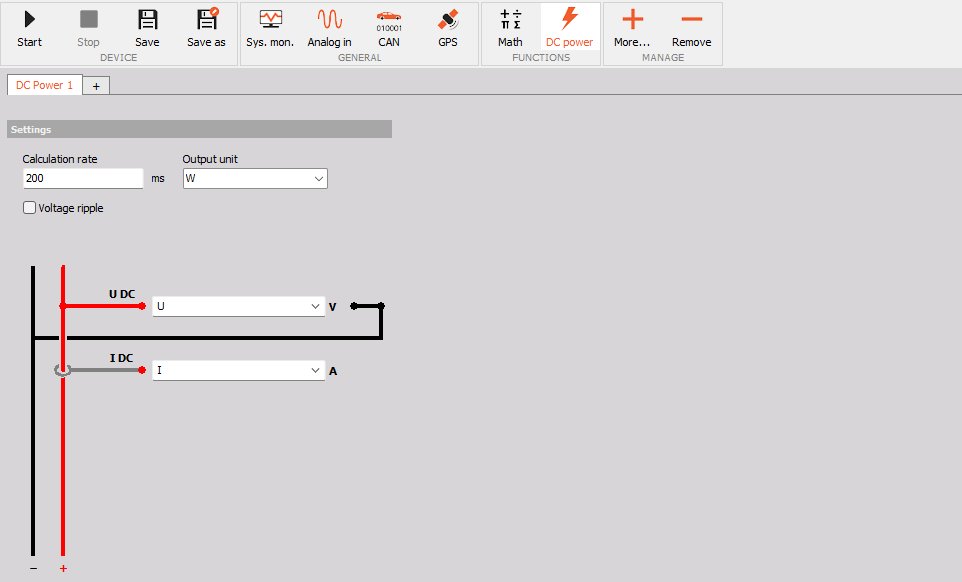
The DC power function block is added in the Config view under More… -> Add module -> DC power. Every new function block opens in its own tab (DC Power 1, DC Power 2, …).To add another DC power calculation, press the + tab. To delete the selected function block, press Remove.
Settings
- Calculation rate - defines how often the DC power is calculated\, in milliseconds (default is 200 ms\, which gives 5 values per second). NOTE: The calculation rate is not the sample rate. The input channels are still acquired at the sample rate set on the device\, and the calculation rate only sets how often the result is calculated.
- Output unit - the unit of the calculated power. The user can choose between W, kW and MW.
- Voltage ripple - when enabled\, the function block also calculates the voltage ripple of the selected voltage channel\, expressed in %.
Channel selection
The wiring diagram shows how the voltage and current are measured on the DC line (+ and -):
- U DC - select the voltage channel from the drop-down list. The voltage is measured between the + and - line.
- I DC - select the current channel from the drop-down list. The current is measured on the + or - line.
Only channels that are selected as used in the Analog in module will be available in the drop-down lists.
Output channels
The function block creates the following output channels, calculated at the defined calculation rate:
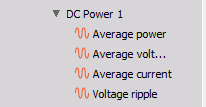
- Average power - average DC power in the selected output unit (W\, kW or MW).
- Average voltage - average value of the selected voltage channel in V.
- Average current - average value of the selected current channel in A.
- Voltage ripple - voltage ripple in %. This channel is available only when the Voltage ripple option is enabled.
NOTE: In RT, run mode, you have no option to change the settings because all of them are locked.