Time Region Marker
The Time Region Marker is a powerful tool for calculating statistical values within a custom region of interest on the Recorder.
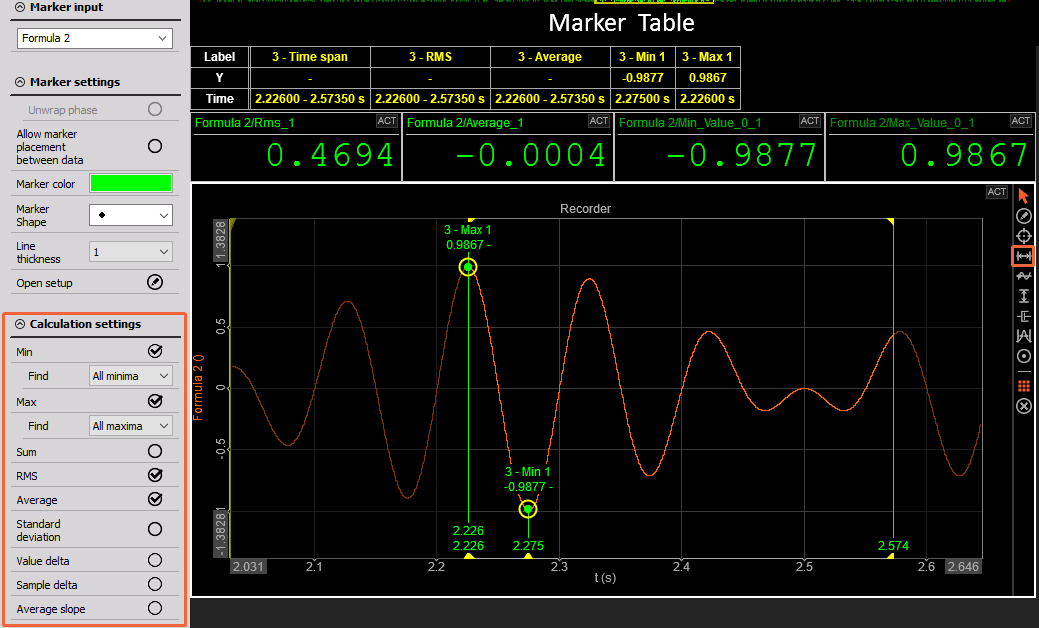
You can add a Time Region Marker by clicking the corresponding icon on the Marker Panel located on the right side of the widget. You can place as many markers as needed until you cancel the “Add” operation — simply do this by right-clicking your mouse.
Output Channels
The Time Region Marker can output several channels, depending on your selection:
- Min (Valley or minima)
- Max (Peak or maxima)
- Sum
- RMS
- Average
- Standard Deviation
- Value Delta
- Sample Delta
- Average Slope
You can view all Marker values in the Marker Table, which can be added from the Marker Panel. For a more compact and organized display, you can enable the Transpose Marker Table option.