Basic Statistic
Basic Statistic calculates summary values from measurement signals on the device. Use it to obtain Average, RMS, Minimum, Maximum, and Peak-Peak values over fixed blocks or across an acquisition.
1. Open Statistics on the device
Select the device in the left sidebar, then open Config → Math. Select Add math, then choose Statistics under the Statistics category.
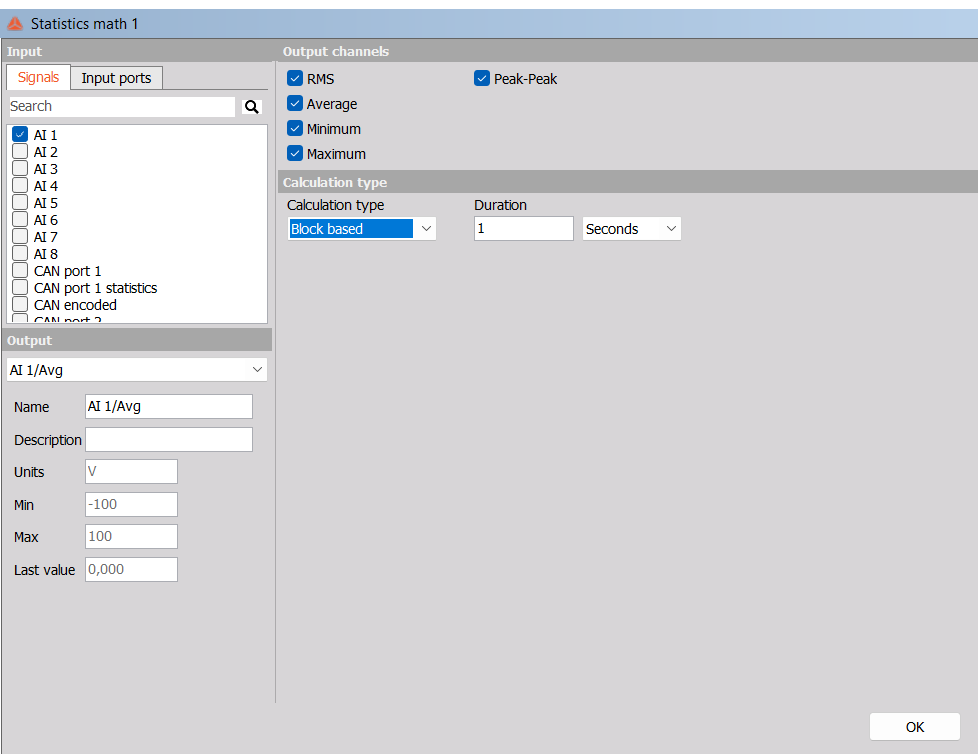
A setup window opens with input selection on the left and calculation settings on the right. To edit an existing block, select Setup in its Math overview row.
Keep the intended device selected when adding the block so that processing is configured on that device.
2. Select the input signals
On the Signals tab, select the checkbox beside each signal you want to process. Use Search to find a signal by name. With keyboard navigation, select the signal in the list and press Space to toggle its checkbox.
Selecting AI 1 creates outputs for that input when the corresponding output checkboxes are enabled. Selecting additional inputs applies the same calculation settings to each input independently.
Choose numeric measurement signals suitable for statistics. The device reference supports scalar integer and floating-point signals with a time domain expressed in seconds; complex and array signals are unsupported. Inputs can have different sampling rates because each input is processed independently. See the Statistics function block reference.
3. Choose the output channels
Enable the required checkboxes in Output channels. Only enabled statistical outputs are created.
| Output checkbox | Meaning | Example output name |
|---|---|---|
| Average | Arithmetic mean of the input samples. | AI 1/Avg |
| RMS | Square root of the mean of the squared samples. | AI 1/RMS |
| Minimum | Lowest sample value in the calculation span. | AI 1/Min |
| Maximum | Highest sample value in the calculation span. | AI 1/Max |
| Peak-Peak | Difference between the highest and lowest sample values. | AI 1/PeakToPeak |
For samples 1, 2, and 3, Average is 2, RMS is approximately 2.160, Minimum is 1, Maximum is 3, and Peak-Peak is 2.
RMS includes the signal’s DC component. For a constant input of 2 V, both Average and RMS are 2 V, while Peak-Peak is 0 V.
4. Configure Block based calculation
Choose Block based in Calculation type. Set Duration, then choose Seconds or Samples in the adjacent selector.
| Duration unit | How to configure it | Example |
|---|---|---|
| Seconds | Enter the time covered by each block. | 1 Seconds calculates each completed one-second block. |
| Samples | Enter the number of input samples in each block. | 1000 Samples calculates each completed group of 1000 samples. |
The documented minimum is 0.001 seconds or 1 sample. Use a whole number for a duration in samples.
Each block starts a fresh calculation and produces one result per enabled output when the block completes. Its timestamp corresponds to the last input sample in the block.
For a regularly sampled input at 1000 samples/s, a duration of 1000 Samples covers one second. At 10000 samples/s, the same number of samples covers 0.1 seconds. Check the input rate when choosing a sample count.
A block needs enough incoming data to complete before its first result is available. With a 10-second duration, allow a complete block before expecting an output update.
5. Configure Overall calculation
Choose Overall in Calculation type to calculate across the acquisition. The Duration field and Seconds/Samples selector disappear in this mode.
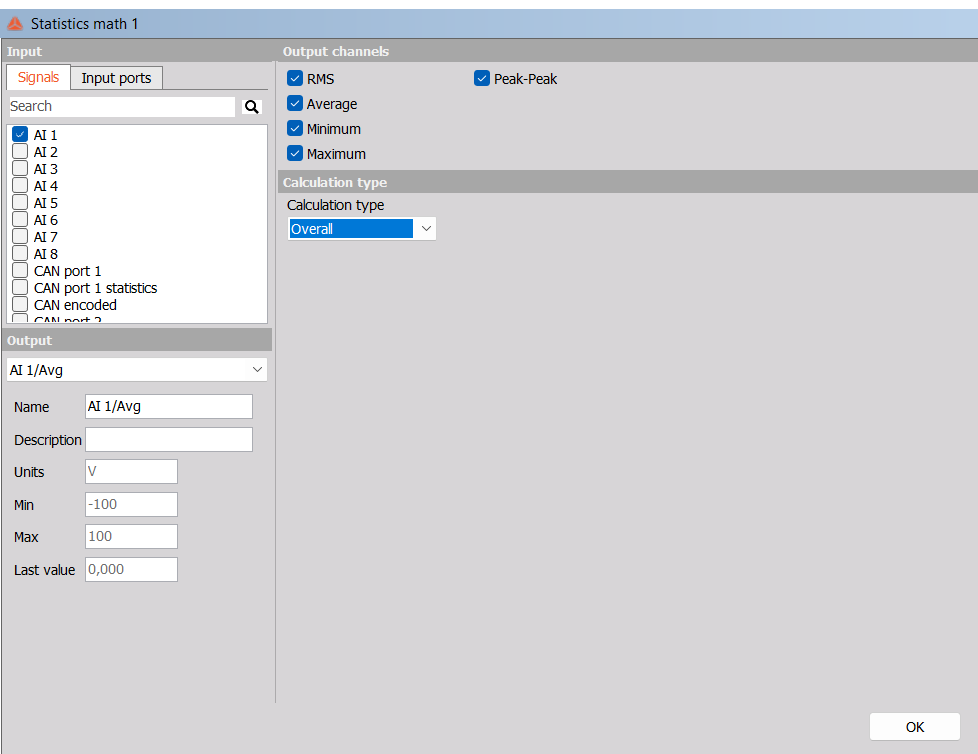
Overall accumulates the samples received from the start of acquisition and updates its results periodically. It does not create a fresh independent window for each update.
Use Overall to follow accumulated test statistics. Use Block based when each result should describe a separate time interval or sample group. Longer Overall acquisitions retain earlier samples in the result; they do not behave like a moving window.
6. Review the generated channels
Use the Output selector in the lower-left part of the setup window to inspect a generated signal. The example lists AI 1/Avg, AI 1/RMS, AI 1/Min, AI 1/Max, and AI 1/PeakToPeak.
The output panel shows Name, Description, Units, Min, Max, and Last value. In the verified view, Name and Description are editable; Units and range/value fields are read-only.
Select OK to close the setup window and review the block in the Math overview.
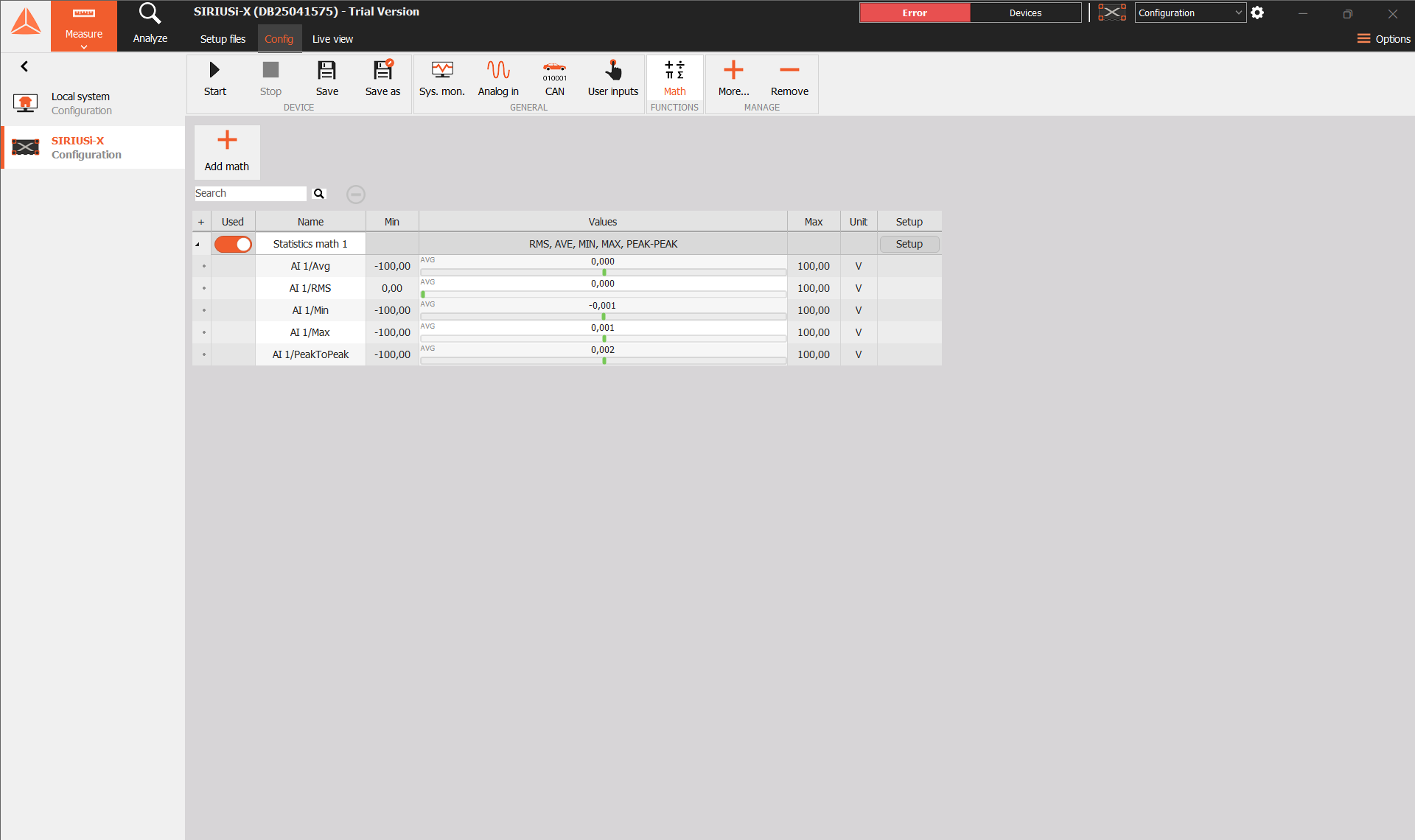
The overview groups the outputs beneath the Statistics block. Use its Used switch to enable or disable the block. Select Setup to reopen its settings.
The overview’s Min and Max columns describe channel ranges. The calculated minimum and maximum measurements are the separate /Min and /Max output channels.