Fatigue
The on-device Fatigue module performs rainflow cycle counting on a load signal directly on the measurement system. Its settings control preprocessing, cycle counting, and the bins used for output histograms and matrices.
For background information, see the DewesoftX Fatigue analysis page. The on-device controls described here define the scope of this module.
Input and output
Select the load signal in Input. Use Search to locate a channel in a longer list. Choose an input with the physical scaling and range needed for the analysis.
The Output selector lists enabled results, for example AI 1/FromToMatrix, AI 1/RangeMeanMatrix, AI 1/MinMaxMatrix, and AI 1/Range. The example outputs have units of cycles. Name and Description are editable; Units, Min, and Max are read-only output properties.
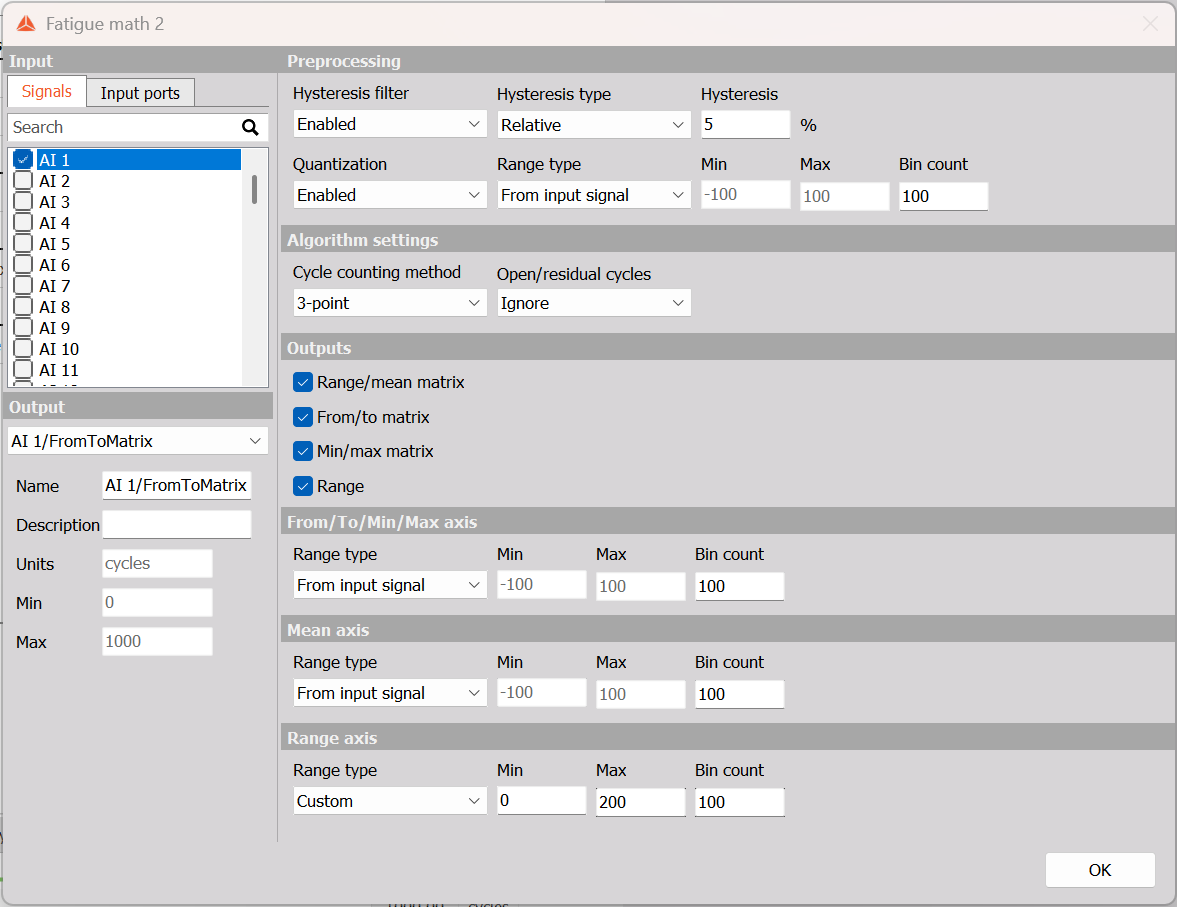
Example: AI 1 with relative hysteresis 5%, quantization enabled, 3-point counting, residual cycles ignored, and all four outputs enabled. The Range axis uses a custom range of 0 to 200 with 100 bins; the other ranges come from the input signal.
Preprocessing
Hysteresis filter can be Disabled or Enabled. Enabling it shows Hysteresis and Hysteresis type, with Relative and Absolute selections. Hysteresis filtering removes small excursions before counting. Select the threshold representation and enter a value appropriate to the load signal.
Quantization can also be Disabled or Enabled. When enabled, it shows Range type, Bin count, Min, and Max. Quantization divides the chosen range into discrete bins. This is a preprocessing step; its bin settings are separate from the output-axis settings.
For each range selector, From input signal uses the input signal’s range and disables manual Min and Max entry. Custom enables those fields so that a range can be entered explicitly.
Algorithm settings
| Parameter | Available choices |
|---|---|
| Cycle counting method | 3-point or 4-point. |
| Open/residual cycles | Ignore, Close, or Report. |
Select how the rainflow calculation handles cycles and the residual portion that does not form closed cycles. Keep the residual-cycle choice consistent when comparing results from different tests.
Output-axis settings
Three groups define the bins used to represent cycle counts:
- Range axis: the size of the cycle excursion, from its minimum to its maximum.
- Mean axis: the mean level of the cycle.
- From/To/Min/Max axis: the signal levels used for the from/to and min/max matrix axes.
Each group has Range type, Bin count, Min, and Max. Select From input signal to use the input range, or Custom to enter the bounds manually. Bin count controls how many intervals the range is divided into. More bins give a finer distribution; choose ranges and bin counts that suit the expected load variation.
Outputs
Enable the required selections under Outputs:
| Selection | Result representation |
|---|---|
| Range | A histogram of cycle counts by cycle range. |
| Min/max matrix | A matrix of cycle counts by minimum and maximum signal level. |
| From/to matrix | A matrix of cycle counts by from and to signal level. |
| Range/mean matrix | A matrix of cycle counts by cycle range and mean level. |
Use the corresponding axis groups to configure the histogram or matrix bins. Output selection and preprocessing are separate: enabling quantization does not replace the output-axis configuration.