FFT
The on-device FFT module converts an input time signal into a frequency spectrum on the measurement system. Use it to examine the frequency components of a measured signal.
For background information, see the DewesoftX Fast Fourier transform page. The controls below are those available in the on-device module.
Input and output
Select a time signal in the Input section. Use Search to find a signal in a longer list. Available inputs depend on the connected measurement system and its configuration.
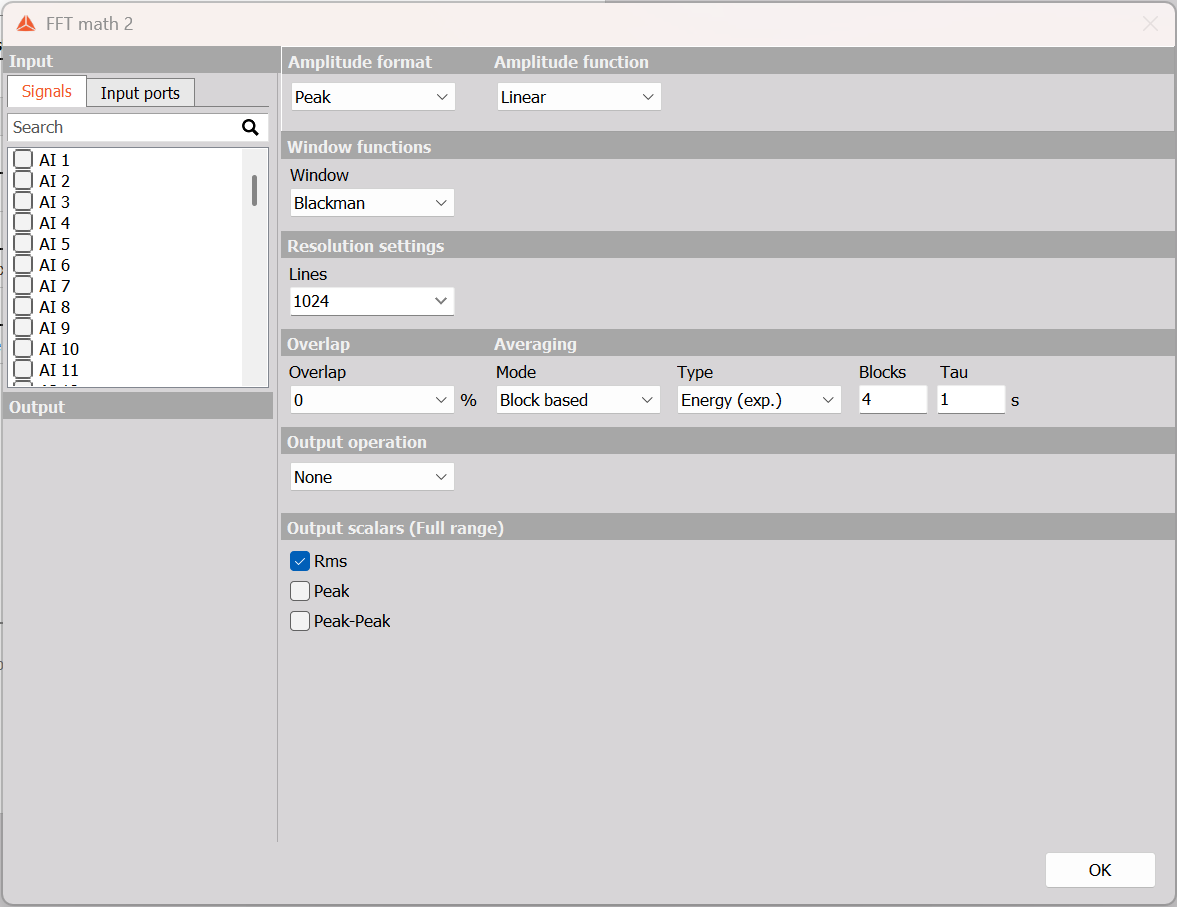
FFT settings before selecting an input. The illustration shows Block based averaging with Energy (exp.), 4 Blocks, Tau = 1 s, and the Rms scalar enabled.
Spectrum settings
| Parameter | Available settings and purpose |
|---|---|
| Amplitude format | Peak, Rms, or Peak - Peak selects the amplitude representation. |
| Amplitude function | Linear, Power, PSD, ESD, or ASD selects the spectral quantity. |
| Window | Rectangular, Hanning, Hamming, Flat top, Triangle, Blackman, Exponent down, Transient, Blackman-Harris, or Kaiser-Bessel. |
| Lines | Sets the number of spectral lines. More lines provide finer frequency resolution for a given input rate and require a longer data block. |
| Overlap | Sets how much data is reused between successive FFT blocks, in percent. The selector offers 0, 10, 25, 50, 66.7, 75, and 90. |
Linear presents signal amplitude. Power expresses squared amplitude; PSD expresses power per unit frequency; ASD is the square root of PSD. ESD expresses energy spectral density. Choose the quantity that suits the measurement and use consistent units when comparing results.
A window reduces the effects of discontinuities at the edges of a finite data block. Its choice affects spectral leakage and the width of frequency peaks. Overlap lets successive blocks share samples: at 50%, half of the preceding block is reused.
Averaging
The Mode selector provides:
- No averaging: calculate individual FFT spectra without combining successive spectra.
- Block based: use Blocks to set the number of blocks included in an average.
- Overall: accumulate the spectral average across the acquisition.
With averaging enabled, Type offers Linear, Energy, Energy (exp.), and Maximum. Linear averages amplitudes, Energy averages squared amplitudes, and Maximum retains the highest value at each spectral line. Energy (exp.) enables Tau, in seconds, to control the averaging response. A larger time constant gives a slower response to changes.
Output operation
Choose None, Integration, Double integration, Derivation, or Double derivation. These operations apply the selected integration or differentiation to the frequency-domain result. Select an operation that matches the physical input quantity and the result required.
Full-range scalar outputs
Enable the required checkboxes under Output scalars (Full range): Rms, Peak, and Peak-Peak. These request scalar results in addition to the spectrum. The amplitude format and scalar selection are separate controls.