Counters
The on-device Counters module configures the measurement system’s counter inputs for event counting, waveform timing, and sensor measurements such as rotational angle and speed.
The available counter channels, signal sources, and settings depend on the connected hardware. The sections below describe the controls in the measurement-system counter setup. Select a mode supported by your device and use the connection diagram to check the signal assignments.
Open the counter setup
- Select the Measurement system in DewesoftX and open Config.
- Open Counters. If it is not shown, use More… and select Counters under General.
- Click Setup on the required counter group, such as CNT 1.
- Choose the Basic application, configure the inputs, and enable the required output channels.
- Confirm the configuration with OK.
| Basic application | Use |
|---|---|
| Event counting | Count input events, use a gate or direction signal, or count encoder edges |
| Waveform timing | Measure period, pulse width, frequency, duty cycle, or time between edges on two signals |
| Sensor (encoder, CDM, tacho…) | Use a counter-sensor definition to calculate angle and frequency from sensor pulses |
Event counting
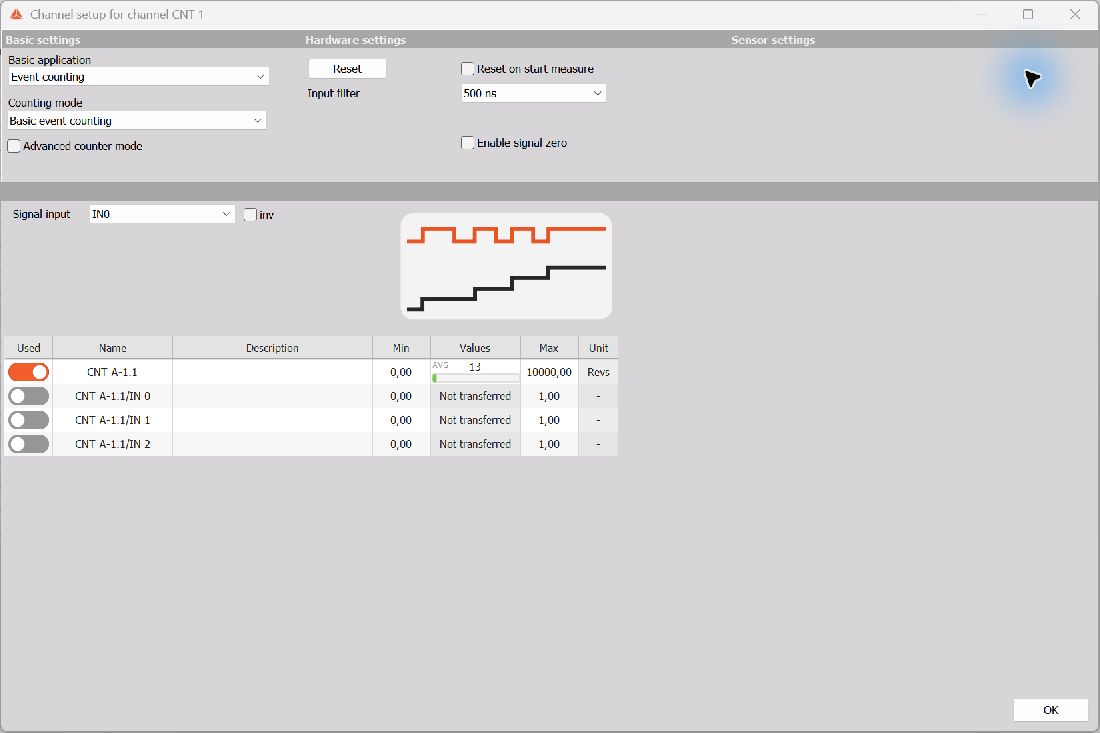
Select Event counting as the Basic application, then choose the Counting mode.
| Counting mode | Function | Signal assignments |
|---|---|---|
| Basic event counting | Counts events on the selected input | Signal input |
| Gated event counting | Counts input events while the gate condition permits counting | Signal input and Signal gate |
| Up/down counting | Uses a second signal to control the counting direction | Signal input and Signal up/down |
| Basic encoder counting | Evaluates quadrature signals to determine count and direction | Signal A, Signal B, and optional Signal Z |
Encoder counting
For Basic encoder counting, assign the encoder’s quadrature signals to Signal A and Signal B. Select Encoder mode:
| Encoder mode | Edges evaluated |
|---|---|
| X1 | Rising edges of A |
| X2 | Rising and falling edges of A |
| X4 | Rising and falling edges of both A and B |
X2 and X4 increase the number of evaluated edges per encoder cycle. Select the mode to match the required resolution and the encoder signal quality.
Encoder zero enables use of the encoder’s index signal. Signal Z shows the assigned index input; it may be fixed by the hardware. In advanced encoder counting, Encoder pulses is also available for the calculation setup.
Advanced counter mode
Enable Advanced counter mode to access additional calculated outputs and a Calculation setup tab. The available outputs follow the selected counting mode. Basic event counting offers Events and Frequency; advanced encoder counting offers Encoder and Frequency output channels.
Review the output units in Calculation setup. Frequency units can be selected as Hz, kHz, or MHz. Controls that do not apply to the selected mode are disabled. The Output channels tab also shows the associated raw counter channels and digital inputs.
Waveform timing
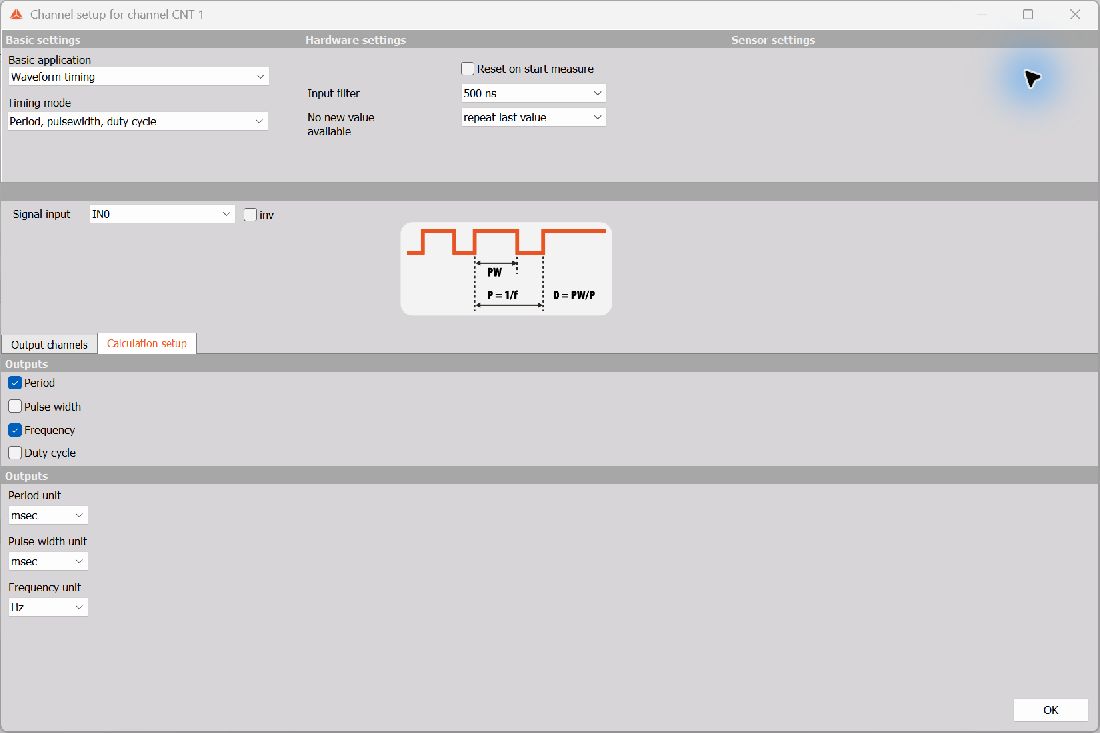
Select Waveform timing as the Basic application. Two Timing mode options are available.
Period, pulsewidth, duty cycle
Assign Signal input, then use Calculation setup to enable the required outputs:
| Output | Meaning | Unit choices |
|---|---|---|
| Period | Time between consecutive rising edges | sec, msec, usec |
| Pulse width | Duration of the high part of the signal | sec, msec, usec |
| Frequency | Repetition rate, equal to 1 / period | Hz, kHz, MHz |
| Duty cycle | High-pulse duration divided by period, expressed as a percentage | % |
No new value available controls the output between new measurements. Choose repeat last value to retain the last measured value, or make zero value to output zero when a new value is unavailable.
Two pulse edge separation
Choose Two pulse edge separation to measure the time between edges on two signals. Assign Signal A and Signal B. Use the inv options where required to match the signal polarities and consult the displayed connection diagram.
Sensor mode
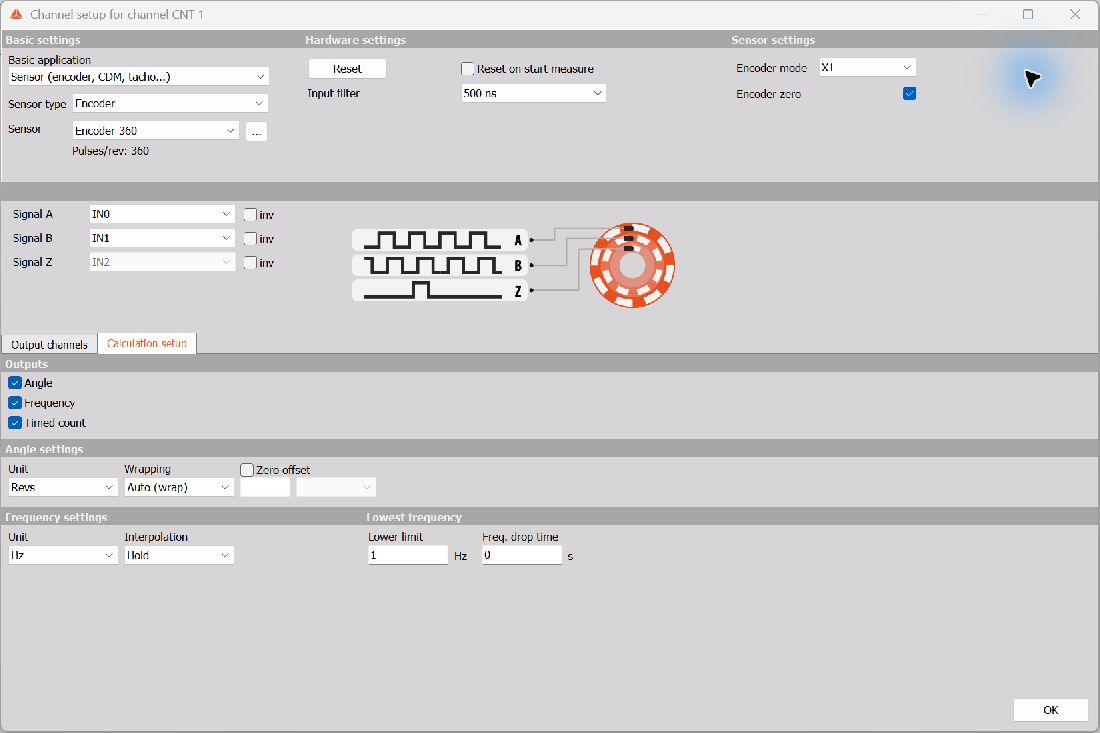
Choose Sensor (encoder, CDM, tacho…), select a Sensor type, and select the matching Sensor definition. The displayed sensor information, such as Pulses/rev, identifies the definition used for the calculation. The button beside the Sensor field opens its details.
The sensor-type list includes Encoder, Tacho, Geartooth, CDM, Geartooth with zero, CDM + TRG, Geartooth with missing teeth, Geartooth with double teeth, Linear encoder, Linear pulses sensor, Tape sensor, and Custom geartooth. Available sensor definitions depend on the configured sensor database.
Assign the inputs shown for the selected sensor. Encoder sensors provide Encoder mode and Encoder zero settings; other sensor types show the controls applicable to their signal pattern.
Calculation setup
Use Calculation setup to choose the outputs and their representation. For the encoder sensor setup, the following controls are available:
| Area | Available controls |
|---|---|
| Outputs | Angle, Frequency, Timed count |
| Angle settings | Unit: Revs, Degrees, Counts, or Radians; Wrapping: Auto (wrap), Wrap, or Unwrap |
| Zero offset | Enable Zero offset and enter an offset in Teeth or Degrees |
| Frequency settings | Unit: RPM or Hz; Interpolation: Hold, Linear, or Smoothed |
| Lowest frequency | Lower limit in Hz and Freq. drop time in seconds |
Wrap represents angle within a repeating range; Unwrap preserves accumulated angle across successive revolutions. Interpolation selects how frequency values are represented between updates. Set the low-frequency controls to suit the slowest motion and the required response when pulses become infrequent.
Common hardware settings
Input filter helps reject short glitches that could otherwise cause false counts. Select a value that suppresses unwanted pulses while preserving the shortest valid pulses you need to measure. The inspected device provides Off, 500 ns, 1 us, 2 us, 4 us, 5 us, and 7.5 us; the available values depend on the hardware.
Signal input and the other signal-source dropdowns select the counter’s physical or internal sources. The inspected setup offers IN0, IN1, and ADC CLK for the main signal assignments, with IN2 assigned to Signal Z. Use the source choices offered by your device. inv reverses the selected signal’s logical polarity.
Reset resets the counter manually where the selected mode provides it. Reset on start measure resets it when measurement starts. In basic event-counting modes, Enable signal zero exposes the Signal Z input for signal-controlled zeroing.
Output channels
Use the Used switches to select the counter results and digital input channels required for the measurement. The output grid displays Name, Description, Min, Values, Max, and Unit. Name, Description, Min, and Max can be edited; the displayed unit and available result channels follow the selected application and calculation settings.
The screenshots illustrate example configurations. Select the mode, sensor definition, inputs, and outputs for your own hardware and application.
Further information
See the DewesoftX Counters page for background on counter principles, and Counter sensors for sensor definitions. Use the settings actually offered in the measurement-system counter setup when configuring on-device counters.