Angle sensor math
The on-device Angle sensor math module converts an analog trigger signal into rotational information. Select a sensor definition that matches the connected sensor, then configure trigger detection and the output units.
For background information, see the DewesoftX Angle sensor math page. The settings below are those available in the on-device module.
Input and output
Select the analog sensor signal in Input. Use Search to find it in a longer list. The input sampling rate and signal quality affect how precisely trigger crossings can be detected.
The Output selector provides the angle and frequency channels, for example AI 1/Angle and AI 1/Frequency. Select a result to inspect its properties. Name and Description are editable; Units, Min, Max, and Last value are read-only information.
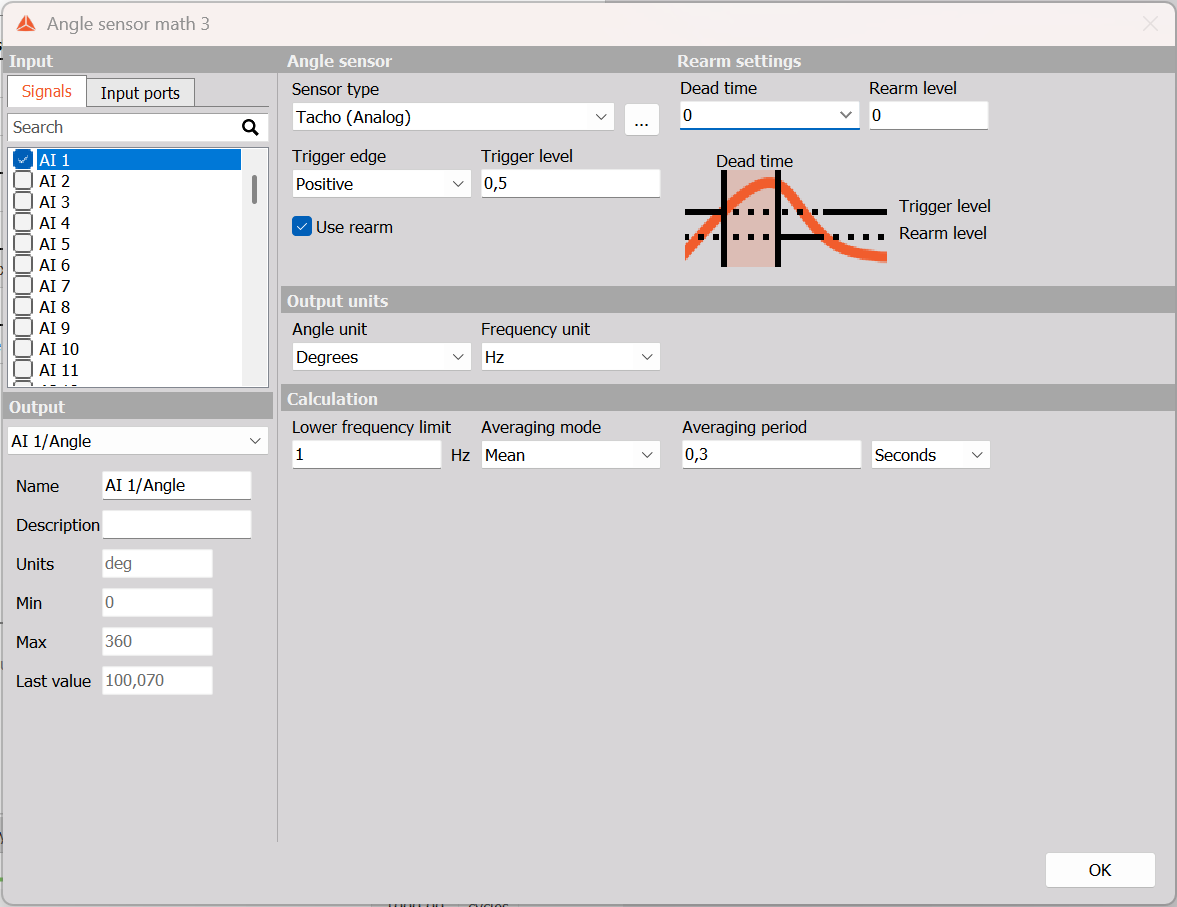
Example: AI 1 with Tacho (Analog), positive-edge triggering at 0.5 V, rearm enabled at 0 V, dead time 0, angle in Degrees, frequency in Hz, lower frequency limit 1 Hz, and Mean averaging over 0.3 Seconds.
Angle sensor
| Parameter | Purpose |
|---|---|
| Sensor type | Selects the sensor definition used to interpret the incoming pulses. The list depends on the available sensor definitions. |
| Define sensor | Opens the Counter sensors editor to inspect or define a sensor. |
| Trigger edge | Positive detects the rising edge; Negative detects the falling edge. |
| Trigger level | Sets the signal level used for trigger detection, in the input signal’s units. |
| Use rearm | Enables a separate rearm level to distinguish a new trigger from fluctuations around the trigger threshold. |
Examples in the sensor list include Tacho (Analog) and analog missing-tooth sensors such as 60-2 (Analog). Select the definition that matches the actual pulse pattern; the available list is not a guarantee that every sensor type is suitable for every input.
With Use rearm enabled, Rearm settings shows a Rearm level field and a diagram of the trigger and rearm levels. For a positive trigger, choose a rearm level below the trigger level so that the signal must return before another rising-edge trigger can be detected. Set the levels to suit the measured waveform. Dead time sets a hold-off interval during which new triggers are ignored. Choose it to reject unwanted closely spaced edges without suppressing valid sensor pulses.
Output units
Angle unit offers Revs, Degrees, Counts, and Radians. Frequency unit offers Hz and RPM. Choose units appropriate to the measurement and to any subsequent calculations that use the results.
Calculation
Lower frequency limit is specified in Hz and sets the lowest rotation frequency to detect. Choose it according to the slowest operating speed that needs to be measured. A very low setting can require a longer data buffer; if the module reports a buffer-size warning, review the lower frequency limit for the measurement.
Averaging mode offers None and Mean. Selecting Mean shows Averaging period and an interval selector with Seconds or Cycles. Enter a period and choose whether it represents a time interval or a number of cycles. Averaging can stabilise a fluctuating frequency result, with a slower response as the averaging interval increases.