Exact frequency
The on-device Exact frequency math module determines the frequency of a dominant component in selected input signals. It is useful when a signal’s frequency needs to be measured more precisely than by simply reading the highest FFT line, or when level crossings are unsuitable for a period measurement.
The calculation uses FFT-based peak interpolation and works best with signals close to a pure sine wave. The result depends on signal quality, the block length, and which frequency component is selected. A frequency range, amplitude threshold, and harmonic tracking can help focus the calculation on the component of interest.
Setup
- Select the Measurement system in DewesoftX and open Config → Math.
- Click Add math and choose Exact frequency under Frequency domain analysis.
- Open the module’s Setup and select the required input signals in the Input panel.
- Set Block size and, if required, enable the amplitude threshold, frequency range, or harmonic tracking.
- Review the output channels and confirm the configuration with OK.
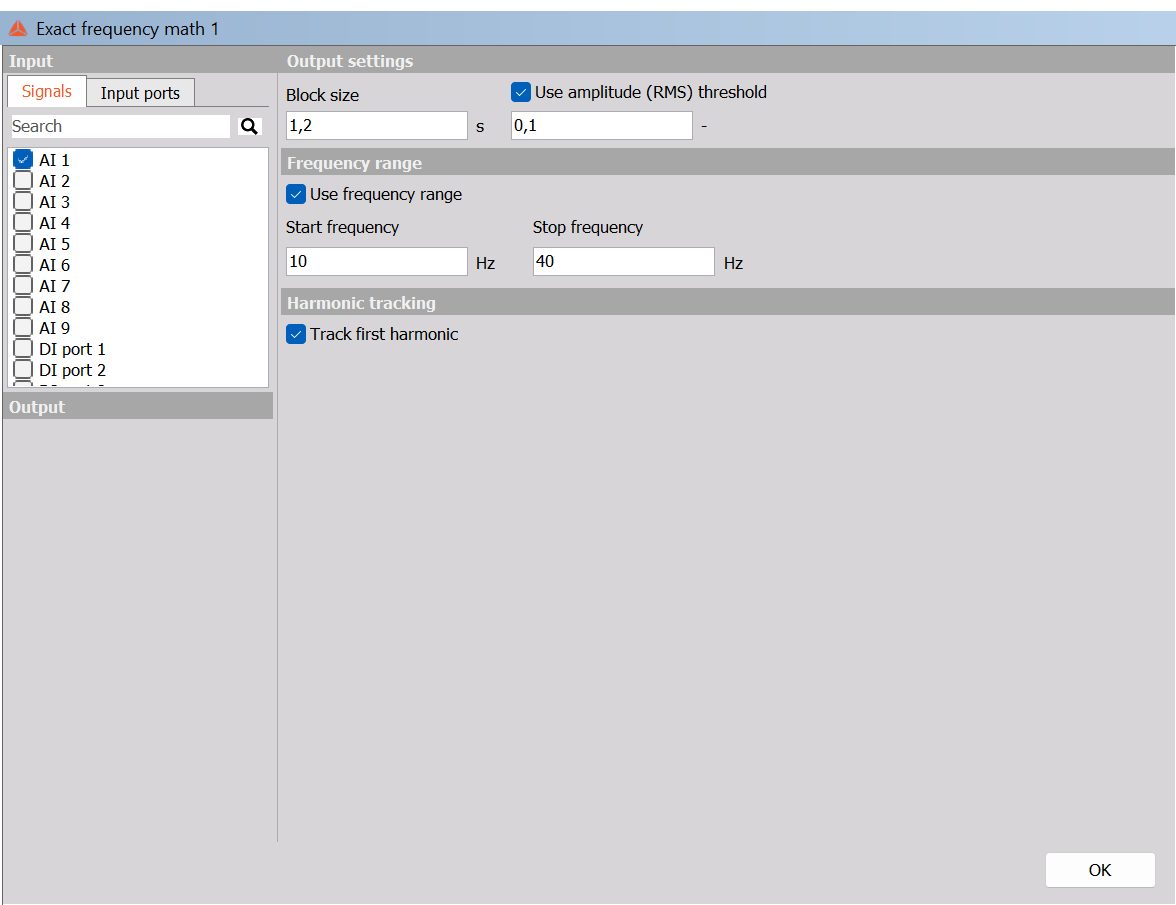
Output settings
Block size
Block size sets the length of the data block used for each calculation, in seconds. It defines the calculation interval and determines how much signal history is available for estimating the frequency.
A shorter block provides more frequent updates but includes fewer signal periods, particularly at low frequencies. A longer block includes more periods and can improve the reliability of the estimate, while updating less frequently.
Choose a block that includes at least 10 periods of the lowest frequency you want to measure:
Minimum block duration ≈ 10 / Lowest frequency of interest
For example, for a component between 10 Hz and 40 Hz, 10 periods at 10 Hz take 1 second. A block size of 1.2 s includes 12 periods at the lower end of this range. Using too few periods can lead to an unreliable estimate.
Use amplitude (RMS) threshold
Enable Use amplitude (RMS) threshold to set the minimum signal amplitude for frequency calculation. When the input signal’s RMS amplitude is below the threshold, its frequency is not calculated.
This helps avoid interpreting noise or a very weak signal as a meaningful frequency. Select the threshold according to the expected signal amplitude and noise level. When the option is disabled, the threshold field is disabled.
Frequency range
Enable Use frequency range to restrict the search to the frequency band of interest.
| Parameter | Description |
|---|---|
| Start frequency | Lower limit of the search range, in Hz |
| Stop frequency | Upper limit of the search range, in Hz |
Set the limits to include the expected component and its variations. For a component expected between 10 Hz and 40 Hz, set Start frequency = 10 Hz and Stop frequency = 40 Hz.
When Use frequency range is disabled, the Start and Stop fields are disabled and the full frequency range up to the input signal’s Nyquist frequency is considered. The Nyquist frequency is half the input sample rate.
Restricting the range can help prevent a stronger, unrelated component elsewhere in the spectrum from being selected.
Harmonic tracking
Enable Track first harmonic to help follow the same component from one block to the next. The DewesoftX reference describes tracking as searching around the frequency found in the previous block, rather than independently selecting the strongest component across the entire spectrum for each block.
Use tracking when the component changes gradually and you want to reduce switching between competing peaks. Tracking does not replace a suitable frequency range, sufficient block length, or a clear input signal.
Input and output
Select the signals to process in the Input panel. Use its search field to find a channel. The module supports multiple inputs, allowing their frequencies to be evaluated using the configured settings.
The frequency results are provided as output channels for subsequent display, storage, or processing. Select the outputs required for the measurement.
Example settings
The screenshot illustrates Block size = 1.2 s, Start frequency = 10 Hz, Stop frequency = 40 Hz, with the RMS threshold and first-harmonic tracking enabled. These are example settings; choose the threshold and frequency limits for your actual input signal.
Further information
See the DewesoftX Exact frequency page for additional background and guidance on choosing the block size. This page describes the controls available in the on-device setup.