Synchronization
NOTE: Manual is updated for DewesoftX 2026.3 synchronization settings. For older versions refer to offline manual.
Synchronization ensures that all devices in a measurement share the same time base, so their samples are aligned in time. One device or an external source provides the time reference, and all other devices synchronize to it.
Devices can be synchronized in two ways:
- Hardware synchronization - devices synchronize using signals transmitted over a sync cable or network, or received from an external time source. Accuracy is in the microsecond range. All Dewesoft USB devices (SIRIUS, DEWE-43, etc.), EtherCAT devices (KRYPTON) and network devices (SIRIUSX, IOLITEX, OBSIDIAN, etc.) support hardware synchronization.
- Software synchronization (SoftSync) - DewesoftX aligns the device clocks through software. Accuracy is between 2 and 10 ms, which is sufficient for slowly changing signals such as temperature. No additional hardware or cables are required.
NOTE: If DewesoftX displays a Sync lost message, follow the troubleshooting steps.
Set up the synchronization
Configure synchronization in Options → Settings → Synchronization (below Devices).
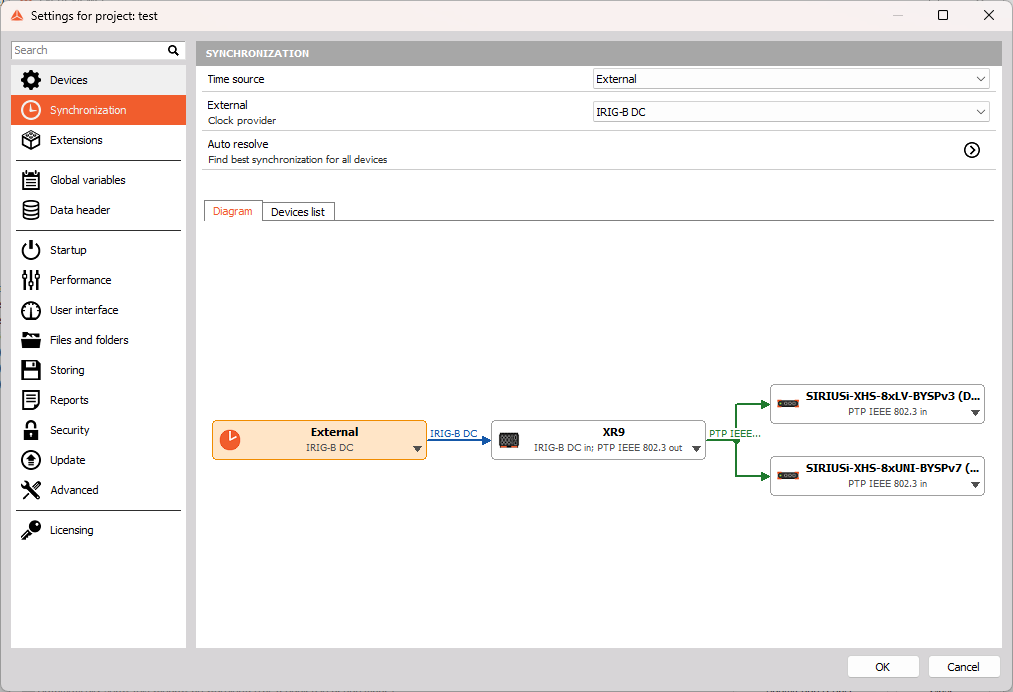
- Connect all devices and add them to DewesoftX.
- Choose the Time source:
- Internal - one of your devices provides the time reference for the others.
- External - a source outside the system provides the time reference, such as an IRIG generator, GNSS satellites, an NTP server or a PTP grandmaster. Select the corresponding synchronization type in External.
- Click Auto resolve, review the proposed modes and click OK.
- Check that no devices appear in red in the Diagram or Devices list. If any do, see Errors.
- Connect the required sync cables, network connections and antennas as indicated by the Diagram. Each line represents a synchronization connection from a source to a receiving device.
These steps are sufficient for most systems. The following sections explain each setting in detail and describe how to configure devices manually.
NOTE: Synchronization settings are available only in measurement mode. In analysis (offline) mode, the page displays Synchronization is not available in offline mode.
Modes and roles
The synchronization mode defines a device’s inputs (in) and outputs (out). Its role describes how it participates in synchronization:
| Mode | Role | Meaning |
|---|---|---|
| IRIG out | Clock source | Uses its internal clock as the system time base and outputs IRIG. |
| IRIG in | Clock receiver | Synchronizes to IRIG from another device or external source. |
| GNSS in; PPS out | Clock gateway | Synchronizes to GNSS and outputs PPS, linking different synchronization types. |
| Standalone | Standalone | Uses its internal clock without synchronization outputs. |
| SoftSync | Software synchronized | Aligns its clock with the system time base through software. |
Synchronization types
The available synchronization types depend on your devices. Absolute time identifies the date and time of a sample; relative timing aligns samples without providing the date and time.
| Type | Description | Absolute time | Accuracy | Typical use |
|---|---|---|---|---|
| PTP IEEE 802.3 | Precision Time Protocol directly over Ethernet. | Yes | <1 µs | Network devices |
| PTP UDP/IPv4 | Precision Time Protocol over UDP/IPv4. | Yes | <1 µs | Network devices |
| IRIG | Time code containing the time of year and year in BCD format. The most common method for synchronizing Dewesoft devices. | Yes | ~1 µs | Stationary systems, sync cable |
| Clock/Trigger | Clock and trigger signals transmitted over the sync cable. Each clock pulse triggers sample acquisition. | No | ~1 µs | Stationary systems, sync cable |
| RES | The device sample clock, output through its sync connector. | No | ~1 µs | Triggered cameras |
| GNSS | Time received from satellite systems such as GPS, GLONASS, Galileo and BeiDou through a GNSS receiver. No distance limit between devices. | Yes | ~1 µs | Mobile and distributed systems |
| PPS | Pulse per second: a signal with one pulse each second. | No | ~1 µs | Devices with PPS inputs or outputs |
| NTP | Network Time Protocol. Provides time from an NTP server over the network. | Yes | ~10–100 ms | When no other external time source is available |
| Dewesoft NET measurement unit | Receives time from the measurement unit (MU). | Yes | depends on the unit | DewesoftX NET clients without local devices only |
Typical setups
Several SIRIUS devices connected with the sync cable
- Set Time source to Internal.
- Click Auto resolve, then OK. One device or chain becomes the clock source (e.g. IRIG out), and the others synchronize to its output (IRIG in).
Devices synchronized to an external IRIG generator
- Set Time source to External and External to IRIG.
- Set the devices connected to the generator to IRIG in.
Mobile measurement with a GNSS receiver
- Set Time source to External and External to GNSS.
- Set the GNSS receiver to GNSS in; PPS out.
- Set the measurement devices to PPS in to synchronize them to the receiver. Auto resolve may also use a gateway, for example by setting one device to PPS in; IRIG out and the others to IRIG in.
Devices synchronized with NTP
- Set Time source to External and External to NTP.
- Click Auto resolve, then OK. One USB or EtherCAT device or chain synchronizes to NTP and provides a synchronization output for the others (e.g. NTP in; Clock/Trigger out). The other devices synchronize to that output. Devices with their own NTP support (e.g. SIRIUSX, IOLITEX) are set to NTP in.
- For each device in an NTP in mode, click its settings button and enter the NTP servers (see NTP).
Only software synchronization
If your devices cannot use hardware synchronization, for example because there is no sync cable or no common synchronization type, use SoftSync. One device can be set to Standalone to provide the time base, with the others aligned to it through software.
If no device is configured as Standalone or a Clock source, the Windows system clock on the computer running DewesoftX provides the time reference for the measurement system.
Synchronization settings in detail
The page contains two sections:
- The upper section contains the system settings: Time source, External (when applicable) and Auto resolve.
- The lower section displays the devices in either the Diagram or the Devices list. Use the tabs to switch between these views. Both let you view and change the same settings.
If no devices that support synchronization are present, the page displays No devices.
Time source
Time source determines where the system time reference originates:
- Internal - one of your devices provides the time base as the clock source or standalone device.
- External - a source outside the measurement system provides the time reference. The External row appears so you can select its synchronization type.
When you change the time source, DewesoftX reconfigures all devices to use it, following the same rules as Auto resolve. With Internal, the current clock source retains its role.
External
When Time source is set to External, select the synchronization type provided by the external source, such as IRIG, GNSS, PPS, NTP or PTP UDP/IPv4.
- The list includes only synchronization types that at least one of your devices can receive. If no devices are present, all types are listed.
- Dewesoft NET measurement unit is available only on DewesoftX NET clients without local devices. The client receives its time reference from the measurement unit (MU).
When you change the external synchronization type, DewesoftX reconfigures all devices to synchronize to it, either directly or through clock gateways.
GNSS and NTP are always external time references. A device configured for GNSS in or NTP in therefore requires Time source to be set to External, with External set to the matching type.
Auto resolve
Auto resolve proposes a synchronization configuration for all devices using the selected Time source. It favors the most precise supported hardware synchronization, uses clock gateways where needed, and retains SoftSync for devices that work best with it.
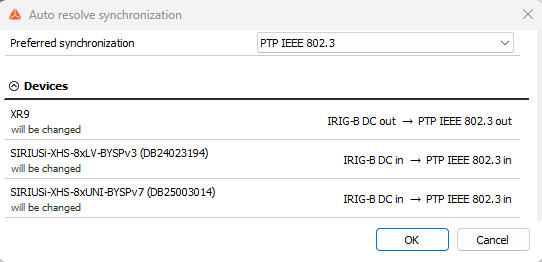
In the Auto resolve synchronization dialog:
- Preferred synchronization - the recommended option appears first. Select another type to preview an alternative configuration.
- Devices - review each device’s proposed mode and any changes. Red devices cannot synchronize with the selected type (Unresolvable).
Locked device modes and your selected External reference remain unchanged. Only one USB or EtherCAT device or chain can use NTP in; the others synchronize through its output (see NTP).
If no valid configuration is available, the dialog displays No valid synchronization was found for these devices.
Click OK to apply the proposed modes, or Cancel to keep the current configuration.
Diagram
The diagram (see the picture in Set up the synchronization) shows synchronization flowing from left to right. Each box represents a device or chain.
- Light orange identifies the system time base; red indicates an error.
- Lines show synchronization connections, labelled and colored by type. Short, unconnected lines indicate outputs not connected in the diagram.
- SoftSync devices appear in a separate group without lines.
Hover over a box for details. Click Rearrange to reorganize the layout without changing any settings.
Click ▼ to change a device’s mode or adjust its RES pin divider, when available. For NTP in modes, the settings button beside ▼ opens the NTP settings.
Devices list
The list provides the same settings in one row per device or chain:
- Name - device name and serial number or port.
- Mode - available synchronization modes. You can select a mode before its required source is configured; an error remains until that source is available.
- Description - device role or error. Rows with errors appear in red.
- Settings - opens additional synchronization settings (i.e. the NTP settings for NTP in modes)
- (RES pin divider) - divides the RES output frequency by 1, 2, 4, 8, etc., for example to trigger cameras at a lower rate.
In either view, changing a mode affects only that device. Resolve any resulting errors by adjusting the other devices or using Auto resolve.
Locked devices
Devices that support standalone operation can be locked due to their current operation mode. These devices display locked by the device, and their mode cannot be changed. In order to change the synchronization mode, you must manually stop the device operation by pressing the Stop operation button.
Errors
If the synchronization configuration is invalid, the Synchronization item in the settings appears in red. You must resolve all errors before closing the settings. Otherwise, DewesoftX displays Unable to exit settings - Check synchronization settings.
| Error | Meaning | How to fix |
|---|---|---|
| Not defined | No synchronization mode is assigned to the device. | Select a mode, or use Auto resolve. |
| Multiple clock sources | More than one device is configured as a clock source, or a clock source is configured alongside an external time source. | Keep one clock source and configure the other devices to synchronize to its output. |
| Multiple standalone devices | A standalone device is configured alongside another standalone device or a clock source. | Set only one device to Standalone, or configure the devices to use a shared synchronization reference. |
| No clock source exists | The device requires a synchronization input (e.g. IRIG) that no device or external source provides. | Configure a device to provide the required output, select the matching type in External, or change the receiving device’s mode. |
| GNSS/NTP requires Time source set to External | The device is configured to receive GNSS or NTP, which are external time references. | Set the time source to External. |
| GNSS/NTP requires External set to GNSS/NTP | The time source is External, but the selected synchronization type does not match the device’s GNSS or NTP input. | Set External to GNSS (or NTP). |
| Only one Dewesoft USB/EtherCAT device can take NTP in | More than one USB or EtherCAT device or chain is configured for NTP in. | Keep one on NTP in and configure it to provide a synchronization output for the others (e.g. NTP in; Clock/Trigger out), or use Auto resolve. |
GNSS and PPS
The available GNSS modes depend on the receiver:
- GNSS in - the receiver synchronizes to satellite time.
- GNSS in; PPS out - the receiver synchronizes to satellite time and outputs PPS for other devices.
- GNSS in; IRIG out - the receiver synchronizes to satellite time and outputs IRIG for other devices.
GNSS in always requires Time source to be set to External and External to be set to GNSS.
Devices configured for PPS in require a device that provides PPS out, such as a GNSS receiver configured for GNSS in; PPS out. Alternatively, they can use an external PPS source with External set to PPS.
- If the time source is Internal but a device is configured for GNSS in or NTP in, DewesoftX changes the time source to External and selects GNSS or NTP, respectively.
- If External is set to GPS PPS, DewesoftX changes it to GNSS, or to PPS if the devices receive only PPS.
NTP
NTP synchronization works in one of two ways, depending on the device:
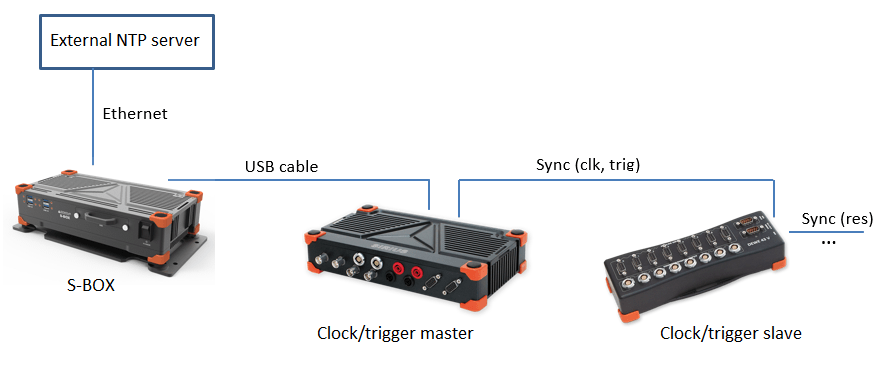
- USB and EtherCAT devices (e.g. SIRIUS, DEWE-43, KRYPTON) - DewesoftX retrieves the time from the NTP server and uses it to synchronize the device. It can synchronize only one such device or chain directly through NTP. The remaining devices synchronize to an output from that device. For example, set the NTP-synchronized device to NTP in; Clock/Trigger out and the others to Clock/Trigger in.
- Devices with their own NTP (e.g. SIRIUSX, IOLITEX, OBSIDIAN) - each device retrieves the time directly from the NTP server. Any number of these devices can be configured for NTP in.
To configure NTP servers, select an NTP in mode and click the device’s settings button. In the Devices list, this button is next to the mode. In the Diagram, it is to the right of the ▼ in the device box. For USB and EtherCAT devices, the button opens the DewesoftX NTP server settings. For devices with their own NTP support, it opens that device’s settings. When synchronizing several devices through NTP, enter the same server address for each device.
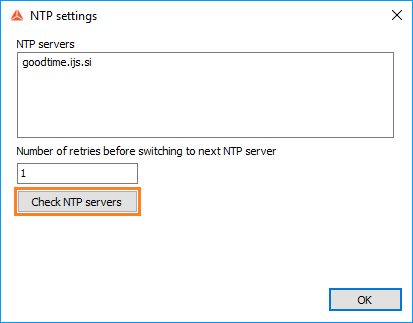
Click Check NTP servers to display the server’s time and date. The check fails if the server address is incorrect.
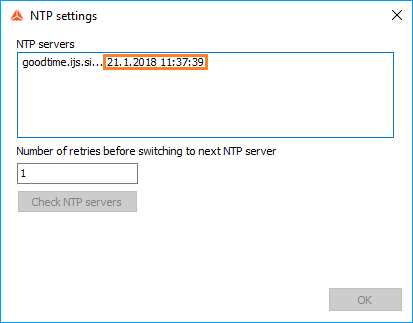
During measurement, the clock icon next to the time is green when NTP synchronization is working:
If NTP synchronization fails, the clock icon turns red and the Sync lost message appears:

ECAT-SYNC-JUNCTION
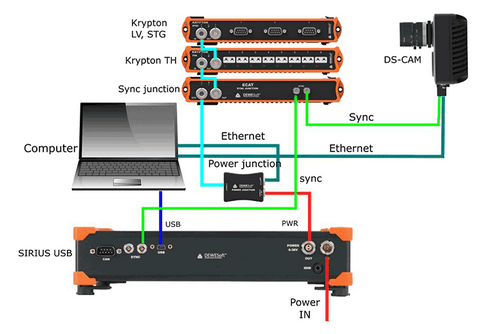
ECAT-SYNC-JUNCTION enables synchronization between KRYPTON EtherCAT devices, SIRIUS USB devices and external sources. DewesoftX detects it automatically, and you configure it like any other Dewesoft device.
A SYNC-JUNCTION with a built-in GPS receiver obtains time directly from satellites. It provides the modes GNSS in and GNSS in; IRIG out instead of PPS in and PPS in; IRIG out. Set Time source to External and External to GNSS.
NOTE: Dewesoft EtherCAT® devices (KRYPTON) are synchronized with each other through the daisy chain cable. No additional synchronization cables are required between them.
Connection examples:
- SIRIUS/DEWE-43 USB with KRYPTON/SIRIUSiwe EtherCAT® devices (accuracy ~1 ms)
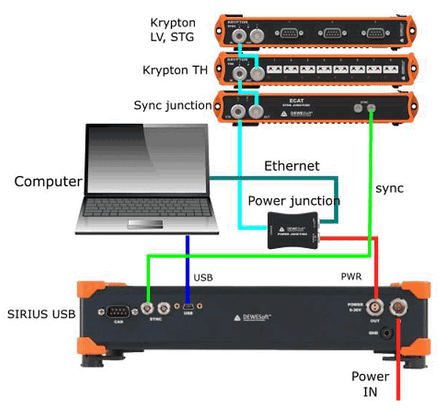
- KRYPTON module with an external IRIG source
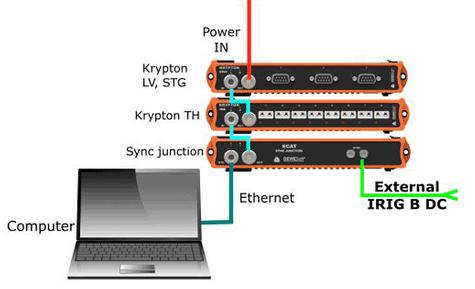
- KRYPTON and SIRIUS USB with an external IRIG source
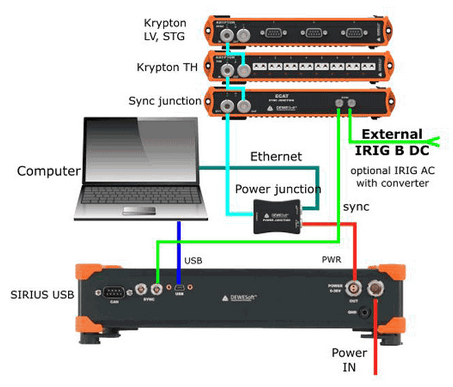
- KRYPTON/SIRIUSiwe with triggered cameras
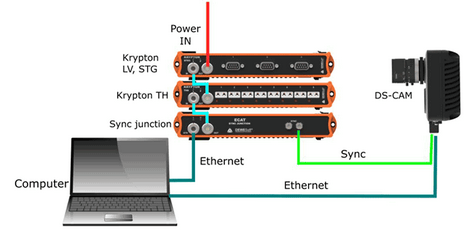
- SIRIUS/DEWE-43 USB with KRYPTON/SIRIUSiwe and triggered cameras
Dewesoft NET systems
Measurement units in a Dewesoft NET system can use the following synchronization types:
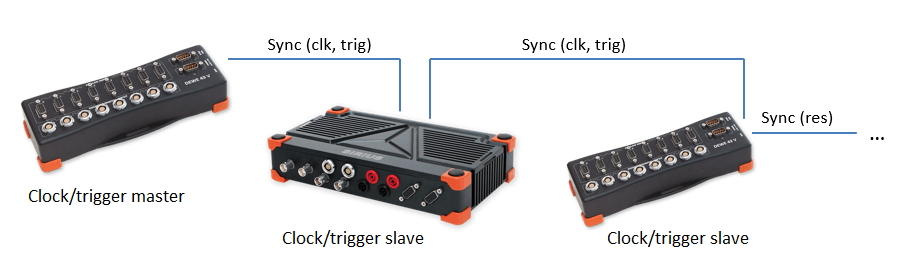
- Clock/Trigger - relative time
- IRIG - absolute time
- GNSS / PPS - absolute time
- NTP - absolute time
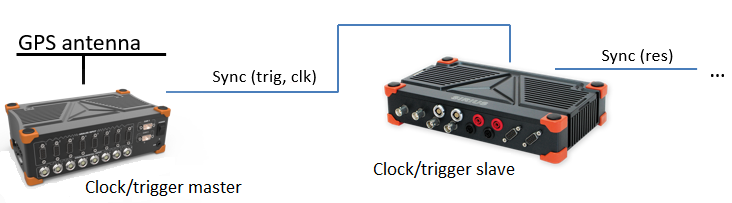
Clock/Trigger connection:
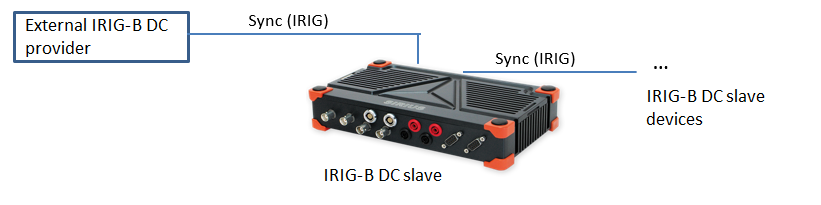
IRIG connection:
- A Dewesoft device as the IRIG source (IRIG out)
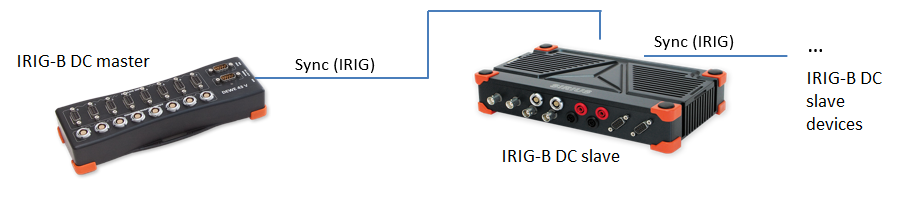
- An external IRIG source (External set to IRIG)
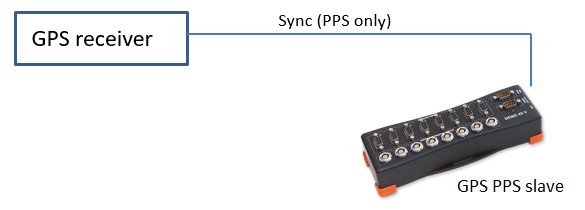
GNSS / PPS connection:
- A Dewesoft device with a GNSS receiver
- An external GNSS receiver
NTP connection:
Troubleshooting
If synchronization does not work, check the following:
- Synchronization settings
- Check that Options → Settings → Synchronization shows no errors (no red rows or boxes). Use Auto resolve to find a valid configuration.
- In the Diagram, check that each device receives its time reference from the intended device or external source. Verify that the physical cable connections match the diagram.
- Synchronization cable (L00B4m-L00B4m)
- Check that the LEMO connectors are securely connected.
- If possible, try another cable to rule out a cable fault.
- For IRIG, the total cable length from the first device to the last device in the chain must not exceed 100 m. Use an IRIG buffer for longer distances.
- Clock source
- If Sync lost repeatedly occurs when a particular device acts as the clock source, that device may have a hardware fault. If possible, try another device as the clock source.
- If Time source is set to External, check that the external source is operating correctly. For a GNSS receiver providing PPS, for example, verify that it detects enough satellites and outputs a valid pulse.