Trigger Marker
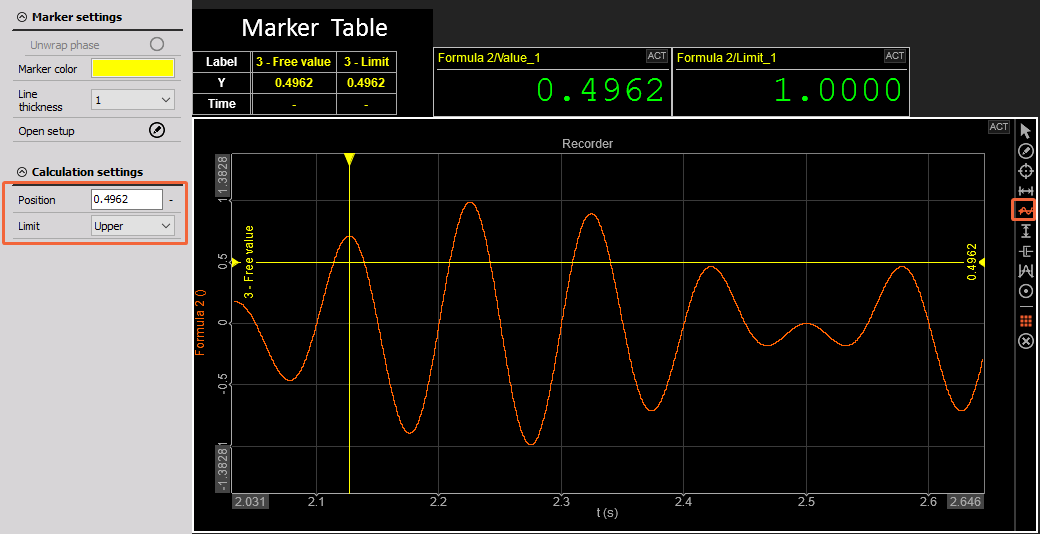
The Trigger Marker is a perfect tool for checking the limit of your channel. You can add a Trigger Marker by clicking the corresponding icon on the Marker Panel on the right side of the widget.
You can place as many markers as you like until you cancel the “Add” operation — simply do this by right-clicking your mouse.
Output Channels
The Trigger Marker outputs two channels:
- Value
- Limit - Only available in Full History mode of Marker
Limit can be defined as upprt or lower limit inside the marker settings or on the left side of the Display under the Marker tab.
NOTE: Limit is checked based on the current position in data - position of yellow cursor.
You can view all Marker values in the Marker Table, which can be added from the Marker Panel. For a more compact and organized display, you can enable the Transpose Marker Table option.