Examples
You can find the following examples of math formula use on this page:
Logic Functions
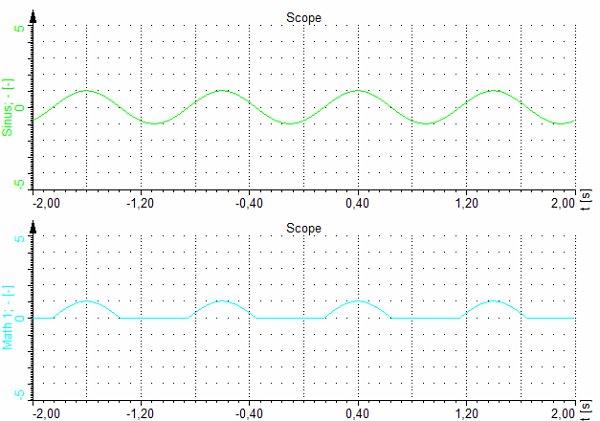
The result of logic operators is always 0 or 1. We will use this fact in the following equation:

The first part of the equation will return 1 when the input channel ‘sinus’ is positive and the value of 0 when the sinus will be negative. Multiplying this result with the original signal will result in cutting the negative part of the signal.
Signals
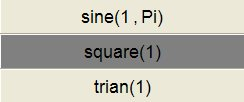
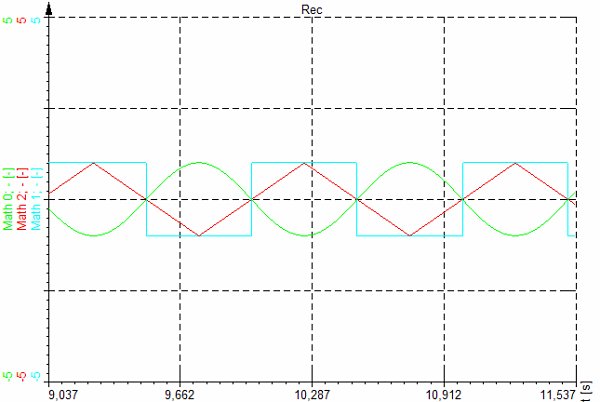
The signal generator is used for making a test signal for testing. We have basic functions like a sine wave, square, triangle, rectangle and noise. We can define also the phase for each individual channel. The phase is defined in radians, so in the example below the sine wave with 1 Hz frequency and 180 deg phase is defined.
The example above results in the following signals:
To generate signals with variable frequencies, it is better to use function generator in Analog out section. The Test AO is free of charge and can produce signals with variable frequencies, amplitudes and phases.
Measure Functions
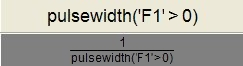
The following example shows the measurement of the pulsewidth. Let’s say that the input is a square wave and we want to measure the pulse width of this channel. First of all, we need to translate the input signal in the logic with ‘F1’>0. This will give a value of 1 for positive and value of zero for negative values of the input signal. The pulsewidth function will then measure the time between each transition. If we want to measure the frequency, we can calculate the inverse of this function as seen below.
The graph shows a pulse width measurement (Math0) and frequency measurement (Math1).
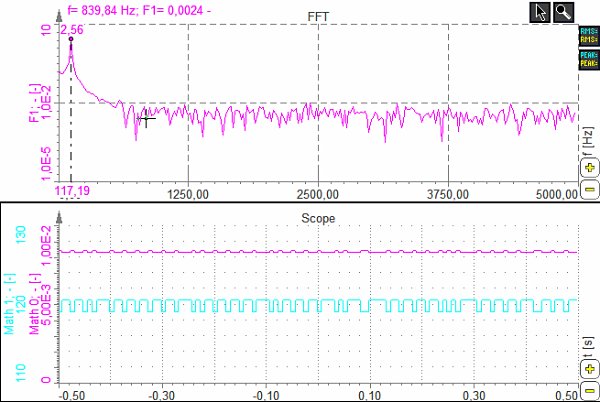
‘pulsewidth’ function is useful for digital signal. The resolution of the measurement is limited by the sample rate.
If we want to measure the pulse width or frequency of sine waves, it is better to use Exact frequency math module, described in the following chapters.
Stopwatch
There are two functions in Measure section of math which helps to measure time and value between events. The Stopwatch functions enable us to measure the time between a start and stop event. The ‘measdiff’ function makes the same measurement, but we can define the measurement channel instead of time.
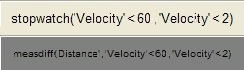
In the example shown we measure the brake time and brake distance. The first example gives the time of braking between 60 km/h and 2 km/h.
The second channel measures the distance between 60 and 2 km/h. This is achieved by defining the Distance channel as the calculated value.
The graph below shows the example of measured data - input channels of velocity and distance. The meter shows the time and distance of braking.
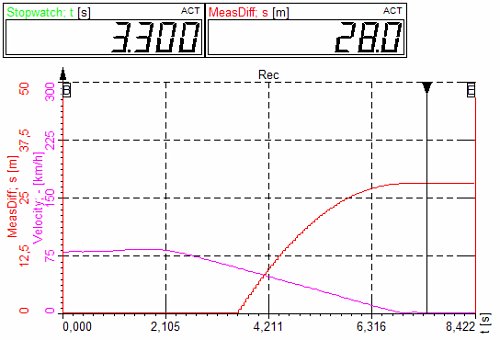
Dewesoft 7 interpolates the velocity and distance channels. So for examples if measured velocity points are 61.2 and 59.2, it will take the time in between those two values as the start trigger.
Input Events
The input events combined with count procedures are very useful for counting events (for example event counting).

The example above counts up when the right cursor key is pressed and counts down when the left cursor key is pressed.
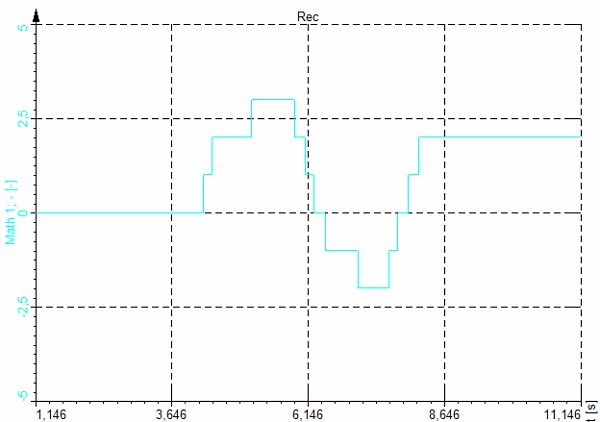
The Keypressed option in formula uses the virtual key codes.
| Symbolic constant name | Value(decimal) | Mouse or keyboard equivalent |
|---|---|---|
| VK_LBUTTON | 1 | Left mouse button |
| VK_RBUTTON | 2 | Right mouse button |
| VK_CANCEL | 3 | Control-break processing |
| VK_MBUTTON | 4 | Middle mouse button (three-button mouse) |
| VK_XBUTTON1 | 5 | Windows 2000: X1 mouse button |
| VK_XBUTTON2 | 6 | Windows 2000: X2 mouse button |
| — | 7 | Undefined |
| VK_BACK | 8 | BACKSPACE key |
| VK_TAB | 9 | TAB key |
| — | 10–11 | Reserved |
| VK_CLEAR | 12 | CLEAR key |
| VK_RETURN | 13 | ENTER key |
| — | 14–15 | Undefined |
| VK_SHIFT | 16 | SHIFT key |
| VK_CONTROL | 17 | CTRL key |
| VK_MENU | 18 | ALT key |
| VK_PAUSE | 19 | PAUSE key |
| VK_CAPITAL | 20 | CAPS LOCK key |
| VK_KANA | 21 | IME Kana mode |
| VK_HANGUEL | 21 | IME Hanguel mode (maintained for compatibility; use VK_HANGUL) |
| VK_HANGUL | 21 | IME Hangul mode |
| — | 22 | Undefined |
| VK_JUNJA | 23 | IME Junja mode |
| VK_FINAL | 24 | IME final mode |
| VK_HANJA | 25 | IME Hanja mode |
| VK_KANJI | 25 | IME Kanji mode |
| — | 26 | Undefined |
| VK_ESCAPE | 27 | ESC key |
| VK_CONVERT | 28 | IME convert |
| VK_NONCONVERT | 29 | IME nonconvert |
| VK_ACCEPT | 30 | IME accept |
| VK_MODECHANGE | 31 | IME mode change request |
| VK_SPACE | 32 | SPACEBAR |
| VK_PRIOR | 33 | PAGE UP key |
| VK_NEXT | 34 | PAGE DOWN key |
| VK_END | 35 | END key |
| VK_HOME | 36 | HOME key |
| VK_LEFT | 37 | LEFT ARROW key |
| VK_UP | 38 | UP ARROW key |
| VK_RIGHT | 39 | RIGHT ARROW key |
| VK_DOWN | 40 | DOWN ARROW key |
| VK_SELECT | 41 | SELECT key |
| VK_PRINT | 42 | PRINT key |
| VK_EXECUTE | 43 | EXECUTE key |
| VK_SNAPSHOT | 44 | PRINT SCREEN key |
| VK_INSERT | 45 | INS key |
| VK_DELETE | 46 | DEL key |
| VK_HELP | 47 | HELP key |
| 48 | 0 key | |
| 49 | 1 key | |
| 50 | 2 key | |
| 51 | 3 key | |
| 52 | 4 key | |
| 53 | 5 key | |
| 54 | 6 key | |
| 55 | 7 key | |
| 56 | 8 key | |
| 57 | 9 key | |
| — | 58–64 | Undefined |
| 65 | A key | |
| 66 | B key | |
| 67 | C key | |
| 68 | D key | |
| 69 | E key | |
| 70 | F key | |
| 71 | G key | |
| 72 | H key | |
| 73 | I key | |
| 74 | J key | |
| 75 | K key | |
| 76 | L key | |
| 77 | M key | |
| 78 | N key | |
| 79 | O key | |
| 80 | P key | |
| 81 | Q key | |
| 82 | R key | |
| 83 | S key | |
| 84 | T key | |
| 85 | U key | |
| 86 | V key | |
| 87 | W key | |
| 88 | X key | |
| 89 | Y key | |
| 90 | Z key | |
| VK_LWIN | 91 | Left Windows key (Microsoft® Natural® keyboard) |
| VK_RWIN | 92 | Right Windows key (Natural keyboard) |
| VK_APPS | 93 | Applications key (Natural keyboard) |
| — | 94 | Reserved |
| VK_SLEEP | 95 | Computer Sleep key |
| VK_NUMPAD0 | 96 | Numeric keypad 0 key |
| VK_NUMPAD1 | 97 | Numeric keypad 1 key |
| VK_NUMPAD2 | 98 | Numeric keypad 2 key |
| VK_NUMPAD3 | 99 | Numeric keypad 3 key |
| VK_NUMPAD4 | 100 | Numeric keypad 4 key |
| VK_NUMPAD5 | 101 | Numeric keypad 5 key |
| VK_NUMPAD6 | 102 | Numeric keypad 6 key |
| VK_NUMPAD7 | 103 | Numeric keypad 7 key |
| VK_NUMPAD8 | 104 | Numeric keypad 8 key |
| VK_NUMPAD9 | 105 | Numeric keypad 9 key |
| VK_MULTIPLY | 106 | Multiply key |
| VK_ADD | 107 | Add key |
| VK_SEPARATOR | 108 | Separator key |
| VK_SUBTRACT | 109 | Subtract key |
| VK_DECIMAL | 110 | Decimal key |
| VK_DIVIDE | 111 | Divide key |
| VK_F1 | 112 | F1 key |
| VK_F2 | 113 | F2 key |
| VK_F3 | 114 | F3 key |
| VK_F4 | 115 | F4 key |
| VK_F5 | 116 | F5 key |
| VK_F6 | 117 | F6 key |
| VK_F7 | 118 | F7 key |
| VK_F8 | 119 | F8 key |
| VK_F9 | 120 | F9 key |
| VK_F10 | 121 | F10 key |
| VK_F11 | 122 | F11 key |
| VK_F12 | 123 | F12 key |
| VK_F13 | 124 | F13 key |
| VK_F14 | 125 | F14 key |
| VK_F15 | 126 | F15 key |
| VK_F16 | 127 | F16 key |
| VK_F17 | 128H | F17 key |
| VK_F18 | 129H | F18 key |
| VK_F19 | 130H | F19 key |
| VK_F20 | 131H | F20 key |
| VK_F21 | 132H | F21 key |
| VK_F22 | 133H | F22 key |
| VK_F23 | 134H | F23 key |
| VK_F24 | 135H | F24 key |
| — | 136–143 | Unassigned |
| VK_NUMLOCK | 144 | NUM LOCK key |
| VK_SCROLL | 145 | SCROLL LOCK key |
| 146–150 | OEM specific | |
| — | 151–159 | Unassigned |
| VK_LSHIFT | 160 | Left SHIFT key |
| VK_RSHIFT | 161 | Right SHIFT key |
| VK_LCONTROL | 162 | Left CONTROL key |
| VK_RCONTROL | 163 | Right CONTROL key |
| VK_LMENU | 164 | Left MENU key |
| VK_RMENU | 165 | Right MENU key |
| VK_BROWSER_BACK | 166 | Windows 2000: Browser Back key |
| VK_BROWSER_FORWARD | 167 | Windows 2000: Browser Forward key |
| VK_BROWSER_REFRESH | 168 | Windows 2000: Browser Refresh key |
| VK_BROWSER_STOP | 169 | Windows 2000: Browser Stop key |
| VK_BROWSER_SEARCH | 170 | Windows 2000: Browser Search key |
| VK_BROWSER_FAVORITES | 171 | Windows 2000: Browser Favorites key |
| VK_BROWSER_HOME | 172 | Windows 2000: Browser Start and Home key |
| VK_VOLUME_MUTE | 173 | Windows 2000: Volume Mute key |
| VK_VOLUME_DOWN | 174 | Windows 2000: Volume Down key |
| VK_VOLUME_UP | 175 | Windows 2000: Volume Up key |
| VK_MEDIA_NEXT_TRACK | 176 | Windows 2000: Next Track key |
| VK_MEDIA_PREV_TRACK | 177 | Windows 2000: Previous Track key |
| VK_MEDIA_STOP | 178 | Windows 2000: Stop Media key |
| VK_MEDIA_PLAY_PAUSE | 179 | Windows 2000: Play/Pause Media key |
| VK_LAUNCH_MAIL | 180 | Windows 2000: Start Mail key |
| VK_LAUNCH_MEDIA_SELECT | 181 | Windows 2000: Select Media key |
| VK_LAUNCH_APP1 | 182 | Windows 2000: Start Application 1 key |
| VK_LAUNCH_APP2 | 183 | Windows 2000: Start Application 2 key |
| — | 184-185 | Reserved |
| VK_OEM_1 | 186 | Windows 2000: For the US standard keyboard, the ‘;:’ key |
| VK_OEM_PLUS | 187 | Windows 2000: For any country/region, the ‘+’ key |
| VK_OEM_COMMA | 188 | Windows 2000: For any country/region, the ‘,’ key |
| VK_OEM_MINUS | 189 | Windows 2000: For any country/region, the ‘-’ key |
| VK_OEM_PERIOD | 190 | Windows 2000: For any country/region, the ‘.’ key |
| VK_OEM_2 | 191 | Windows 2000: For the US standard keyboard, the ‘/?’ key |
| VK_OEM_3 | 192 | Windows 2000: For the US standard keyboard, the ‘~’ key |
| — | 193–215 | Reserved |
| — | 216–218 | Unassigned |
| VK_OEM_4 | 219 | Windows 2000: For the US standard keyboard, the ‘[{’ key |
| VK_OEM_5 | 220 | Windows 2000: For the US standard keyboard\, the ‘\|’ key |
| VK_OEM_6 | 221 | Windows 2000: For the US standard keyboard, the ‘]}’ key |
| VK_OEM_7 | 222 | Windows 2000: For the US standard keyboard, the ‘single-quote/double-quote’ key |
| VK_OEM_8 | 223 | |
| — | 224 | Reserved |
| 225 | OEM specific | |
| VK_OEM_102 | 226 | Windows 2000: Either the angle bracket key or the backslash key on the RT 102-key keyboard |
| 227–228 | OEM specific | |
| VK_PROCESSKEY | 229 | Windows 95/98, Windows NT 4.0, Windows 2000: IME PROCESS key |
| 230 | OEM specific | |
| VK_PACKET | 231 | Windows 2000: Used to pass Unicode characters as if they were keystrokes. The VK_PACKET key is the low word of a 32-bit Virtual Key value used for non-keyboard input methods. For more information\, see Remark in KEYBDINPUT\, SendInput\, WM_KEYDOWN\, and WM_KEYUP |
| — | 232 | Unassigned |
| 233–245 | OEM specific | |
| VK_ATTN | 246 | Attn key |
| VK_CRSEL | 247 | CrSel key |
| VK_EXSEL | 248 | ExSel key |
| VK_EREOF | 249 | Erase EOF key |
| VK_PLAY | 250 | Play key |
| VK_ZOOM | 251 | Zoom key |
| VK_NONAME | 252 | Reserved for future use |
| VK_PA1 | 253 | PA1 key |
| VK_OEM_CLEAR | 254 | Clear key |