Reference Marker
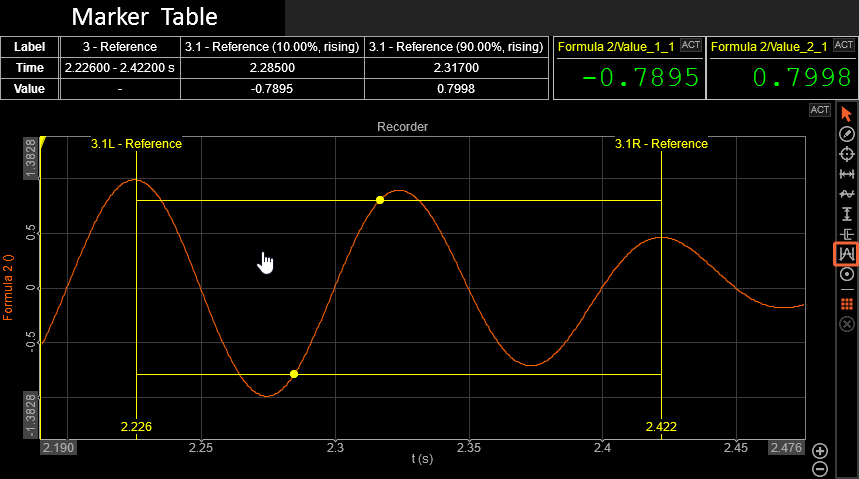
The Reference Marker is a tool for defining a custom reference point on your signal and calculating rise or fall time — typically between the 10% and 90% amplitude levels. It’s ideal for power and electronic applications, such as analyzing switching signals, voltage or current transients, and response times in sensors, actuators, or digital circuits.
You can add a Reference Marker by clicking the coresponding icon on the Marker Panel on the right side of the widget. You can place as many markers as you like until you cancel the “Add” operation — simply do this by right-clicking your mouse.
Output Channels
Reference Marker outputs the following channels:
- Start Time (of the region)
- End Time (of the region)
- Value of The Reference Point
- Time of The Reference Point
Define the Reference Point
GENERAL SETTINGS
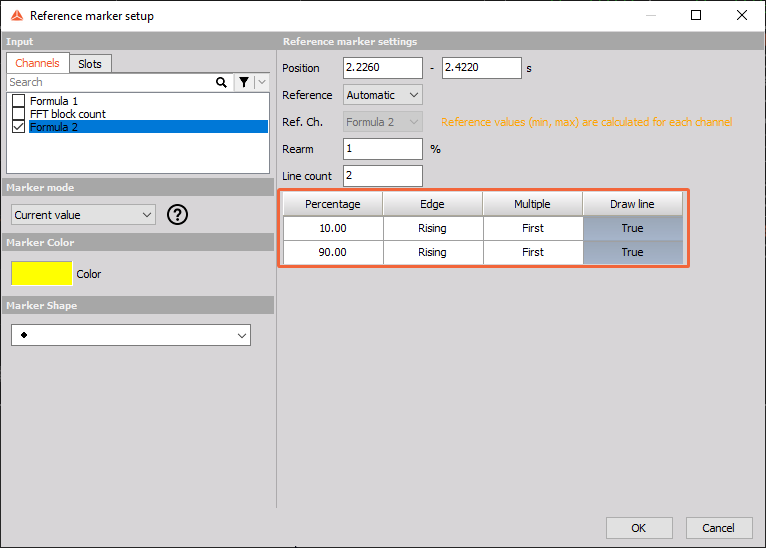
You can customize the number of reference points you want to detect in your area of interest by adjusting the Line Count value. The same number of reference points will then appear in the table below.
For each reference point, you can define:
- The percentage position where it should be placed,
- Which edge (rising or falling) it should track,
- Whether to get the reference only from the first edge or last edge - (useful if your signal contains several events), and
- The option to draw a horizontal line for visualization.
Additionally, you can define the rearm percentage to improve detection stability when your signal contains noise.
REFERENCE TYPE
You can choose between two Reference types:
Automatic - This is the default setting. In Automatic mode, the reference points are calculated based on the minimum and maximum values within the selected region.
Manual - In Manual Reference mode, an additional marker is created, which can be placed or linked to the same or a different channel. The reference points are then calculated between 0 (the minimum) and the value of the new marker (the maximum).
Adding Marker to More Channels at Once
You can add a Free Marker to multiple channels at once:
Within the same Recorder: Hold CTRL while adding a marker. Across multiple Recorder groups: Hold CTRL + ALT while adding a marker.